
How to Replace Client Calls With Loom and Voxer (A System That Actually Works)

I was on my third call of the week with a client. Not because anything was wrong, just because they had questions. Reasonable questions. The kind I could have answered in four minutes if I'd just been able to show them what I meant instead of trying to describe it out loud while also reading their face to see if it was landing.
I hung up, opened Loom, recorded a five-minute walkthrough, dropped the link in Voxer with a quick voice note, and moved on with my day.
They responded twenty minutes later. "Oh. That makes so much more sense. Thank you."
No calendar invite. No "does Thursday work?" No six minutes of small talk before we got to the point.
That was it for me. I've been doing it this way ever since.
What are Loom and Voxer? (Plain English, no tech speak)
If you haven't used them yet, here's the short version.
What is Loom?
Loom is a screen recording tool. You hit record, walk through whatever you need to show — a document, a design, a process, a revision — and it generates a shareable link. Your client clicks the link and watches the video. They don't need an account. There's no download. It just works.
What is Voxer?
Voxer is a walkie-talkie app. You hold a button, talk, and the other person hears your voice message whenever they open the app. They can listen at 2x speed, reply when they have a minute, and the whole thread stays there so nothing gets lost. It's a text thread, but with voices.
Together, these two tools replace about 80% of the meetings I used to take.
The async client communication workflow that changed my week
Here's how it actually plays out.
A client sends me a question. The kind with six layers to it. The old me would have said "let's hop on a quick call" and burned forty-five minutes of both our days.
The new me reads the question, opens Loom, and records exactly what they need to see. Usually their own document, their own dashboard, their own funnel. I'm clicking through it while I talk. I point at things. I explain the why. Five minutes, done.
Then I drop the link in Voxer with a short voice note: "Hey, here's the walkthrough. The part about the email automation starts around 2:30. Let me know if anything's still fuzzy."
They watch it on their lunch break. They reply with a voice note. We're done.
No calendar invite. No "let me find a time that works next Thursday." No reschedule. No fifteen-minute warm-up before we get to the actual thing.
Why this beats a Zoom call (most of the time)
A meeting forces both of you into the same window, whether the conversation needs forty-five minutes or four. Most of the time, it's four.
Async lets the answer be exactly as long as it needs to be. Five minutes? Five minutes. Ninety seconds? Ninety seconds.
It also gives your client something a meeting never does. A recording. Most clients don't remember half of what gets said on a call. They take notes, but their notes aren't the same as watching me click through their dashboard while I explain why their automation is broken.
Now they have the actual answer. On video. Forever.
If you're nodding through this and quietly realizing your calendar is the problem, Work Less Weekly is where I break down small workflow shifts like this every Monday. Capable women, fewer hours, less chaos. Free to join.
Loom vs. Voxer vs. an actual meeting: when to use each
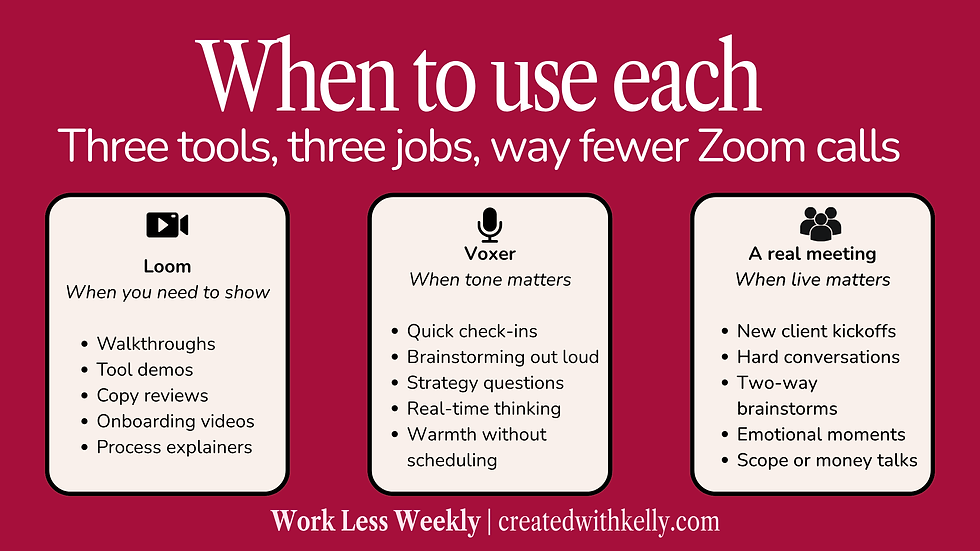
When to use Loom
Anything visual. Anything you'd otherwise screen-share.
Walking a client through a deliverable
Showing them how a tool works
Reviewing copy with inline feedback
Demo-ing a process you want them to repeat
Onboarding videos that don't need to be re-recorded every time you sign a new client
When to use Voxer
Anything you'd otherwise text or email, but with tone behind it.
Quick check-ins
Brainstorming out loud
Strategy questions where how you said it matters
Clients thinking out loud who want a real human on the other end

When to actually take the meeting
I'm not anti-meeting. I'm anti-default meeting.
Real-time calls still earn their keep for:
A new client kickoff (you need to read each other live)
A hard conversation (boundaries, scope, money)
A brainstorm where the back-and-forth is the point
A client who's genuinely in a moment and needs to feel a person on the other end
Everything else? Loom and Voxer.
The unexpected part
Two things happened when I switched to async that I wasn't expecting.
The first one was that my clients started doing more of their own thinking. When you give someone a five-minute video instead of a forty-five-minute call, they have to actually sit with the information.
Process it. Come back with a real question instead of seventeen half-questions blurted into a Zoom box.
The second one was that my own clarity got sharper. When I have to record a Loom, I have to know what I'm actually saying. I can't ramble my way to a point. I have to get there.
Try it for one week
You don't have to blow up your whole calendar. Just try this for seven days.
Next time a client asks a question, before you type "let's hop on a quick call," open Loom instead.
Record the answer. Send it.
See what happens.
I'm betting you get an hour of your week back. Probably more.
FAQ: Loom and Voxer for service providers
Is Loom free?
Yes. Loom's free Starter plan gives you up to 25 videos at 5 minutes each, in 720p. That's plenty for most service providers to test the workflow before paying anything. If you outgrow it, the Business plan runs around $15 per user per month for unlimited recording.
Is Voxer free?
Yes. The free version stores your message history for 30 days, which is fine for most ongoing client conversations. Voxer Pro+AI is around $7.99 a month (or $59.99 a year) and unlocks longer storage, voice-to-text transcription, and a few other features that are nice but not essential to get started. I personally have the Voxer Pro subscription and pay $36/year which gives me the ability to transcribe voice notes and save all my conversation threads.
Do my clients need an account to watch a Loom?
No. They click the link, the video plays. That's it. No download, no signup, no friction.
Do my clients need an account to use Voxer?
Yes, they'll need to download the app and create a free account. It takes about two minutes. I usually walk new clients through it in our onboarding so it doesn't become a barrier.
Can I use Loom and Voxer together?
Yes, and this is the part most people miss. Recording a Loom and dropping the link in Voxer with a short voice note is the move. The video does the heavy lifting; the voice note gives it warmth and context.
Are Loom and Voxer secure for client work?
Both offer encrypted connections and standard security for small business use. If you're working with healthcare data, legal documents, or anything regulated, check the specific compliance requirements for your industry before sending sensitive info through either platform.
What's the difference between Loom and Zoom?
Zoom is live and real-time. Loom is recorded and async. Zoom requires both people to be on at the same time. Loom lets you record once and let your client watch when it works for them.
What's the difference between Voxer and Slack?
Voxer is built around voice messaging. Slack is built around text channels. Voxer feels more personal and works better for one-on-one client relationships. Slack is better for ongoing team communication with multiple channels.
How long does it take to set up Loom and Voxer?
About ten minutes total. Sign up, download the app or browser extension, send yourself a test message, and you're ready.

Want more workflow shifts like this?
This is exactly the kind of thing I break down every Monday in Work Less Weekly. Small changes. Real specifics. Built for capable women who are tired of their business depending on them for everything. ___________________________________________________________________________________________
Kelly Faulkner is the Business Wingwoman behind Created with Kelly, where she helps service providers build businesses that don't depend on them for every single thing.


Comments